
Prepare devices before departure
Minimizing your digital footprint starts before you board the plane. By hardening your devices and curating your data, you reduce the attack surface for border searches and network interception.
Scan your devices for files you no longer need. Delete old boarding passes, document scans, and cached emails. Limiting the amount of data you carry means there is less to scrutinize during border checks. Focus on removing anything that does not directly support your current trip.
Install the latest security patches for your phone, laptop, and tablet. Updates often include fixes for vulnerabilities that could allow malware to steal data or bypass encryption. Keeping your software current is a baseline requirement for maintaining security while abroad.
Audit which apps have access to your location, contacts, and microphone. Revoke permissions for apps that do not need them. Disable background data syncing for non-essential applications to prevent accidental uploads of sensitive information while you are on untrusted networks.
Ensure full-disk encryption is active on all devices. Use strong, unique passwords or biometric locks for every device. If your device is seized or lost, encryption prevents immediate access to your data. Consider using a password manager to generate and store complex credentials.
Secure connections while abroad
Maintaining encrypted communications is the first line of defense. When you land in a new jurisdiction, your digital footprint expands instantly. Airports, hotels, and cafés offer free Wi-Fi, but these networks are often unmonitored by the providers and openly accessible to anyone nearby. Using them without protection is like leaving your front door wide open in a busy city.
Start by disabling automatic Wi-Fi connections on your devices. Most phones and laptops will try to join the nearest open network the moment they detect it. This behavior can connect you to malicious "evil twin" hotspots designed to steal credentials. Manually select only the official network provided by the venue, and verify the name with staff if you are unsure.
Once connected, activate a reputable Virtual Private Network (VPN) before opening any apps. A VPN creates an encrypted tunnel between your device and a remote server, masking your traffic from local snoops. This step is non-negotiable for protecting emails, banking details, and private messages while overseas. Without it, anyone on the same network can see what you are doing.
If you must use a public network without a VPN, switch to cellular data if available. Cellular connections are generally more secure than open Wi-Fi. Alternatively, wait until you reach your accommodation and connect to a trusted, password-protected home network. Treat public Wi-Fi as a convenience for browsing, not for conducting business or sharing personal data.
Navigate border data requests
Border agents increasingly scrutinize digital devices, making it essential to balance legal compliance with data minimization. Preparing your devices requires proactive steps before you reach the checkpoint. This guide walks you through the practical actions to protect your information while adhering to official regulations.
Step 1: Encrypt and Separate Your Data
Before you travel, ensure all devices are encrypted. Use full-disk encryption on laptops and strong passcodes on phones. Separate sensitive work or financial data from personal devices when possible. If you must carry work data, use a dedicated, encrypted drive or cloud storage with a separate password.
Enable full-disk encryption on all devices. Use strong, unique passwords. Store sensitive work data on a separate encrypted drive or cloud account with a distinct password.
Back up your data to a secure cloud service. Then, delete unnecessary files, apps, and browsing history. This reduces the amount of data available for inspection.
Research the specific laws of the country you are entering. Prepare a simple, polite response if asked about your devices. You can decline to provide passwords in some jurisdictions, but know the consequences.
Many devices have a "travel mode" or "visitor mode" that limits access to certain apps and data. Enable this to further isolate your personal information from border inspections.
Step 2: Understand Your Legal Rights
Laws vary significantly by country. In the United States, the Fourth Amendment offers some protection, but exceptions exist for international borders. In the EU, GDPR provides strong data protection, but border controls may still request access. Always check the latest guidelines from official sources like the Department of State or local embassies.
Step 3: Prepare for the Inspection
If asked to unlock your device, remain calm and polite. You can request a supervisor or legal counsel if you are unsure. In some cases, you may be allowed to delete data on the spot, but this can raise suspicion. The best approach is to have already minimized your data.
Step 4: Post-Inspection Security
After the inspection, change your passwords if you suspect any compromise. Monitor your accounts for unusual activity. Consider using a password manager to generate and store complex passwords for all your travel-related accounts.
Step 5: Stay Informed
Travel regulations and technology evolve rapidly. Subscribe to official newsletters from travel security experts and government agencies. This ensures you are always up-to-date with the latest best practices.
Manage digital nomad visa data
Long-term stays require a different approach to data privacy standards than short tourism. Digital nomad visas often mandate background checks, biometric scans, and proof of income, creating a permanent record in local government databases. These records may not carry the same protections as your home country’s data laws.
Start by identifying the specific data retention policies of the host country. Many nations retain criminal background checks for decades, regardless of visa expiration. Check if the local data protection authority publishes guidelines on how long applicant data is stored and who can access it. If the information is unclear, assume the data remains accessible indefinitely.
Next, secure your digital footprint during the application process. Use a dedicated email address and device for visa submissions to prevent cross-contamination of personal and sensitive data. Avoid uploading unencrypted copies of passports or financial statements to unofficial third-party portals. If the government portal lacks two-factor authentication, consider requesting a paper-based alternative if available.
Finally, understand your rights to access and deletion. In jurisdictions with weak privacy laws, you may have no legal recourse to remove biometric data after your visa expires. Document every data request you make and keep copies of all submitted documents. If the host country is part of a regional data protection framework like the GDPR, you may have stronger rights to data erasure.
Respond to data breaches abroad
When you are miles from home and your strategy is tested by a lost device or a confirmed data breach, speed is your only defense. Do not panic, but act immediately. The following protocol minimizes financial loss and identity theft risks by securing your digital perimeter before the breach escalates.
Immediately enable airplane mode or disconnect from all Wi-Fi and cellular networks. This stops active data exfiltration. If the device is physically with you, lock the screen. If it is lost, do not attempt to track it via GPS, as this alerts thieves to its location and functionality.
Call your bank and credit card issuers directly using the numbers on the back of your cards or their official mobile apps. Report the compromise and request temporary freezes on all accounts. Ask specifically about blocking international transactions and issuing new virtual card numbers for any pending digital purchases.
Use a trusted, secure device to log into your primary email and cloud providers. Enable two-factor authentication (2FA) on all critical accounts. Change passwords for any service that uses the same credentials as your compromised device. Revoke active sessions for all devices to force a logout.
If the device is lost or stolen, file a police report with the local authorities. This document is often required by insurance companies and banks to process claims. Additionally, report the identity theft to your country’s central consumer protection agency, such as the FTC in the United States, to create an official record of the incident.
Place a fraud alert or credit freeze with major credit bureaus. This prevents thieves from opening new lines of credit in your name. Monitor your bank statements and credit reports daily for at least six months. Sign up for identity theft protection services if available through your travel insurance policy.
Frequently asked: what to check next
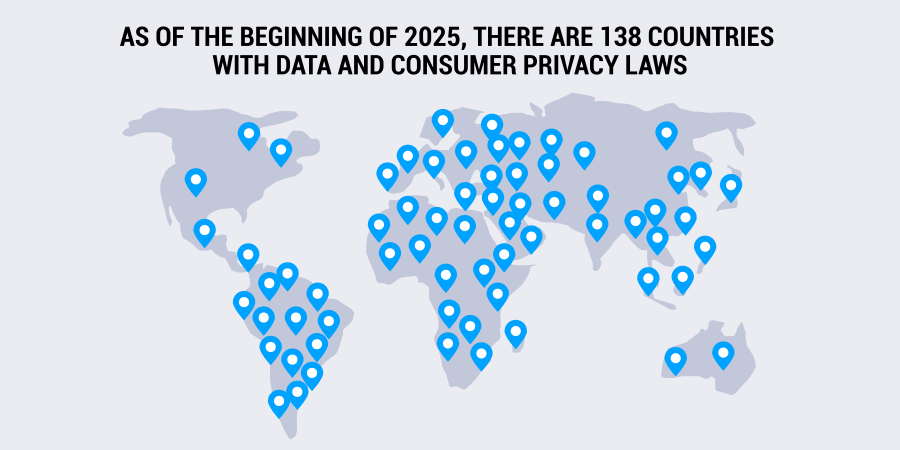
Travelers face a shifting regulatory landscape in 2026, with new state laws in the U.S. and ongoing GDPR revisions reshaping how personal information is handled. Understanding these changes helps you protect your data across borders.
No comments yet. Be the first to share your thoughts!