
Understand new border data rules
Travelers preparing for international transit in 2026 must distinguish between existing border search authorities and proposed social media screening measures. While Customs and Border Protection (CBP) retains broad authority to inspect digital devices at ports of entry, the much-discussed requirement to submit five years of social media history is not currently mandatory for Visa Waiver Program travelers.
The confusion stems from ongoing legislative and administrative discussions. Earlier proposals suggested that all VWP applicants might need to provide extensive social media identifiers. However, following industry and privacy advocacy feedback, the Department of Homeland Security shifted toward a more selective screening model. This means that while you may still be asked to provide social media handles during standard ESTA processing, a deep dive into your five-year history is not a blanket requirement for entry.
It is important to note that device searches at the border remain legally distinct from ESTA application data. CBP officers can legally inspect phones and laptops without a warrant or probable cause. This authority has been upheld in several federal court rulings. Travelers should assume that any data on their devices is accessible to border agents, regardless of changes to social media screening policies.
To prepare, review the official CBP website for the most current ESTA requirements. Do not rely on third-party summaries that may conflate proposed rules with active regulations. Keeping your digital devices encrypted and limiting sensitive data on devices you carry can provide an additional layer of privacy protection during border inspections.
Prepare devices before departure
Reducing your digital footprint starts before you leave home. Carrying less data means less exposure to border inspections, device seizures, or remote access attempts. Follow this ordered sequence to harden your devices and limit the information available to anyone who might inspect them.
Remove all scanned copies of passports, visas, and identity cards from your phone and laptop. Keep only the physical originals or secure, encrypted backups in your password manager. Delete old boarding passes, hotel confirmations, and itinerary screenshots stored in your gallery or email drafts. These files often contain full names, addresses, and travel dates that are unnecessary once the trip is booked.
Audit every app on your primary devices. Revoke location, camera, microphone, and contacts access for any app that doesn't require it for immediate use. Uninstall travel apps you won't use during the trip, such as ride-sharing or food delivery services, which often track location history and payment data. For apps you must keep, ensure they are updated to the latest version to patch known security vulnerabilities.
Verify that full-disk encryption is active on your laptop and mobile devices. On iOS, this is enabled by default with a passcode. On Android, check Settings > Security > Encryption. On Windows, ensure BitLocker is turned on; on macOS, check FileVault in System Settings. Pair this with a strong, unique passcode or biometric lock. Avoid simple PINs or pattern locks, which can be bypassed quickly during a forced device unlock attempt.
Research the specific data inspection policies of your destination and transit countries. In some jurisdictions, border agents may demand access to your device contents. Use built-in features like iOS "Lockdown Mode" or Android's "Private Space" to restrict sensitive data access. Consider using a separate, "clean" device for travel that contains no banking apps, email accounts, or sensitive work files. This device should only hold essential travel apps and offline maps.
Ensure your last full backup is complete and stored securely in the cloud or on an external drive. Test that you can remotely wipe your devices from another computer or phone. This step is critical if your device is lost, stolen, or confiscated. Keep your account recovery information accessible but separate from the device itself. Document your device serial numbers and IMEI numbers in case you need to prove ownership or request assistance from your embassy.
By following these steps, you significantly reduce the amount of personal data that could be accessed or compromised during your travels. This preparation creates a smaller, more manageable attack surface, allowing you to focus on your trip rather than your digital security.
Manage network connections abroad
Public Wi-Fi is a primary vector for data interception. When you connect to an unsecured network in an airport, hotel, or café, your device broadcasts data in plain text. Hackers on the same network can easily capture login credentials, emails, and financial information. To protect your travel data, you must actively manage how and when your device connects to these networks.
Most devices are configured to automatically join known or open networks. This convenience feature is a significant security risk. Go into your Wi-Fi settings and turn off "Auto-Join" or "Auto-Connect" for public networks. This ensures your device only connects when you explicitly select a network you have verified.
A Virtual Private Network (VPN) encrypts the traffic between your device and the VPN server. This makes it nearly impossible for anyone on the same Wi-Fi network to read your data. If you do not have a paid VPN subscription, use your mobile data connection (4G/5G) instead of public Wi-Fi for sensitive tasks like banking or accessing email.
When connected to a public network, your device may allow other devices on that network to access your files. Disable file and printer sharing in your network settings. On Windows, set your network profile to "Public." On macOS and iOS, ensure "File Sharing" is turned off in the Sharing preferences.
Even with a VPN, it is safer to avoid accessing sensitive accounts on public Wi-Fi. If you must check email or bank accounts, use your mobile data connection. If you are forced to use public Wi-Fi, wait until you are back in a secure environment, such as your hotel room with a trusted router or a private cellular connection, to complete transactions.
By following these steps, you significantly reduce the risk of your personal data being intercepted. Always prioritize your mobile data connection for sensitive activities and remain vigilant about the networks you join.
Handle border inspections carefully
Border agents have broad authority to search electronic devices, and they are using it more than ever to check for visa violations or other discrepancies. While this power is well-established, it is not unlimited, and knowing how to handle the process protects both your legal rights and your sensitive data.
Step 1: Prepare Your Devices Before Arrival
Do not wait until you are at the primary inspection booth to think about your devices. Before you board your flight, take these concrete steps to minimize exposure:
- Back up your data: Ensure you have a current, encrypted backup stored in the cloud or on a separate drive that is not with you. If your device is seized, you can replace the hardware without losing your information.
- Power down devices: Instead of putting devices in sleep mode, fully shut them down. This triggers full disk encryption on most modern smartphones and laptops, making data significantly harder to access quickly without the password.
- Remove SIM cards: If possible, remove physical SIM cards from your phone. These can sometimes be swapped into another device to access contacts or messages.
Step 2: Know Your Rights During the Search
In the United States, the Fourth Amendment does not fully apply at the border. Agents can search your phone without a warrant or probable cause. However, they generally cannot compel you to provide your password or biometric data (like a fingerprint or FaceID) if you refuse, though they may detain you for further questioning or seize the device for a forensic analysis that could take weeks.
If you are traveling internationally, research the specific laws of the country you are entering. Some nations have stricter laws regarding encryption and may detain individuals who refuse to unlock devices.
Step 3: Respond Calmly and Legally
If your device is selected for inspection:
- Stay calm: Do not argue with the agent. Resistance can lead to longer detention or additional charges.
- Invoke your right to silence: You are not required to answer questions about the content of your devices beyond basic identification.
- Request legal counsel: If the agent intends to perform a forensic search (which involves copying data to a separate drive), you have the right to request an attorney. This may delay your entry, but it is your legal recourse.
Step 4: Post-Inspection Actions
After the inspection, check your device for any signs of tampering or unauthorized access. If you suspect your data was compromised, change your passwords immediately, especially for email and banking apps. Consider enabling two-factor authentication on all critical accounts if you haven't already.
Remember, the goal is to comply with the law while minimizing the data exposed to inspection. Preparation is your best defense.
Final privacy checklist for travelers
Before you cross the border, run through this verification list. These steps ensure your digital footprint remains minimized and your devices stay secure while abroad.
-
Clear device storage: Delete unnecessary document scans, old boarding passes, and cached location history. Limit the amount of data you carry physically and digitally.
-
Review app permissions: Revoke location tracking and microphone access for apps you don’t use while traveling. Turn off automatic cloud backups for sensitive photos.
-
Prepare for border searches: Know that border agents have broad authority to search electronic devices. Consider using a separate, clean device for travel if you handle highly sensitive work data.
-
Secure network access: Disable automatic Wi-Fi connections. Use a reputable VPN to encrypt your traffic on public networks.
-
Check ESTA updates: As of May 2026, there is no requirement for Visa Waiver Program travelers to submit social media history as part of their ESTA application, but remain alert to potential policy shifts.
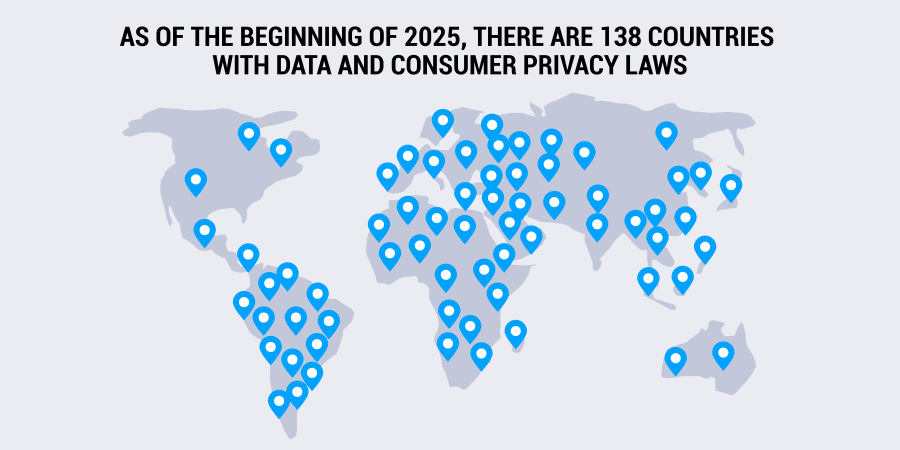
This global landscape of privacy laws shifts frequently. What is protected in one country may be accessible to authorities in another. Staying informed and cautious is your best defense.
Common questions about travel data privacy 2026
Travelers frequently ask how border agents handle personal data and what information is required for entry. The following answers address the most common anxieties regarding device searches and social media history requirements.
No comments yet. Be the first to share your thoughts!