
Pick the right planner for your trip
Choosing an AI travel planning 2026 tool depends on how complex your itinerary is. General large language models like ChatGPT or Gemini are excellent for brainstorming ideas, writing packing lists, or drafting rough schedules. However, they cannot book flights, reserve hotels, or pull real-time pricing.
Dedicated AI travel planners, such as Mindtrip or Wonderplan, bridge this gap. These tools are built specifically for travel logistics. They connect to booking engines to secure reservations and update itineraries when flights change. For simple weekend getaways, a general LLM might suffice. For multi-city trips with tight connections, a dedicated planner saves significant time.
The table below compares the core capabilities of dedicated tools versus general models.
| Feature | Dedicated AI Planner | General LLM (e.g., ChatGPT) |
|---|---|---|
| Real-time booking | Yes | No |
| Live flight/hotel prices | Yes | No |
| Itinerary generation | Detailed & booked | Text-based draft |
| Cost | Freemium or subscription | Free or subscription |
| Best for | Complex, multi-city trips | Simple trips & brainstorming |
If your trip involves only one destination and flexible dates, start with a general model to outline your interests. If you need to lock in prices and manage multiple reservations simultaneously, invest in a dedicated AI travel planning 2026 tool.
Enter details to generate a draft
The quality of your AI travel planning 2026 output depends entirely on the quality of your input. Treat the prompt box like a brief for a human concierge: if you are vague, the result will be generic. If you are specific, the tool can build a structured, realistic itinerary.
Start by defining the non-negotiables. Most tools, like Layla or Canva’s Trip Planner, ask for travel dates, destination, and budget first. Be precise with dates if your schedule is fixed. If you are flexible, indicate a range (e.g., "mid-October") so the AI can suggest optimal weather windows or lower-price days. For budget, set a clear ceiling per person or for the whole group. AI tools often struggle with implicit cultural cost differences, so stating "$150/day for food" is more effective than just "moderate budget."
Next, layer in your interests and constraints. This is where you move from a template to a personal plan. Instead of saying "I like to travel," specify "history, street food, and late-night markets." If you have dietary restrictions, mobility needs, or a dislike for early mornings, state them explicitly. The AI uses these parameters to filter activities and suggest pacing that actually fits your lifestyle.
Step-by-step input guide
Follow this sequence to ensure the AI captures all necessary context for a high-quality draft.

Open your chosen tool and enter the primary destination. If you are multi-destining, list the order of cities. Enter your start and end dates. If your dates are flexible, select the "flexible" toggle if available, or input a 3-5 day window to give the AI room to find better flight or hotel rates.

Input the total budget or daily spend limit. Specify the number of travelers and their ages (e.g., "2 adults, 1 child age 6"). This helps the AI filter for family-friendly activities or adult-only venues. Be realistic; if you set a luxury budget but expect hostels, the AI may hallucinate unrealistic options.

List specific interests such as "photography," "hiking," or "museums." Add constraints like "no stairs" or "vegetarian only." The more granular you are here, the better the AI can curate unique experiences rather than defaulting to top 10 tourist traps.
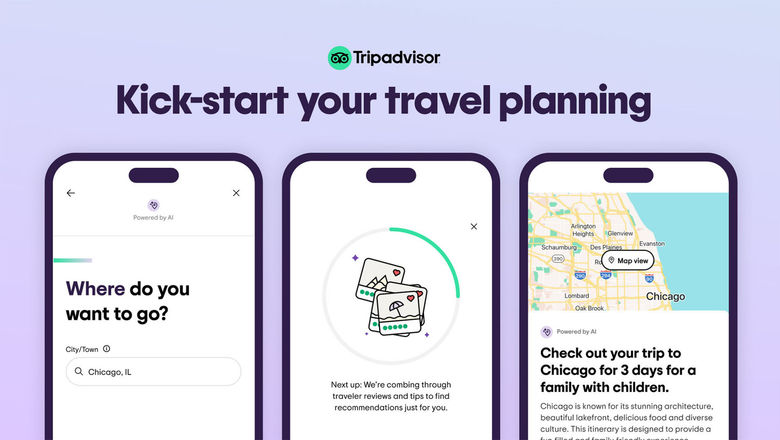
Click the generate button. Review the draft for logical flow. Does the AI suggest a museum in the morning and a beach in the afternoon if they are far apart? Check for pacing. Most tools allow you to tweak individual days before finalizing.
Refine the itinerary with feedback
AI travel planning 2026 tools are rarely perfect on the first try. They often misjudge travel times, suggest overly ambitious schedules, or miss local nuances. Think of the initial output as a rough draft, not a final contract. You can fix these issues by treating the chat interface as a collaborative workspace rather than a static search engine.
Review the draft for logical gaps. If the tool schedules a museum visit immediately after a long flight, flag it. Look for unrealistic transition times between distant locations. Be specific in your correction: instead of saying "this is too rushed," specify the missing buffer, such as "add two hours for lunch and transit to the museum."
AI tools often prioritize famous landmarks over experiences that match your personal interests. If the itinerary includes a crowded, generic attraction you don't care about, ask the AI to replace it. Request alternatives based on your preferences, such as "swap the main tourist trap for a local neighborhood market" or "find a quieter park nearby."
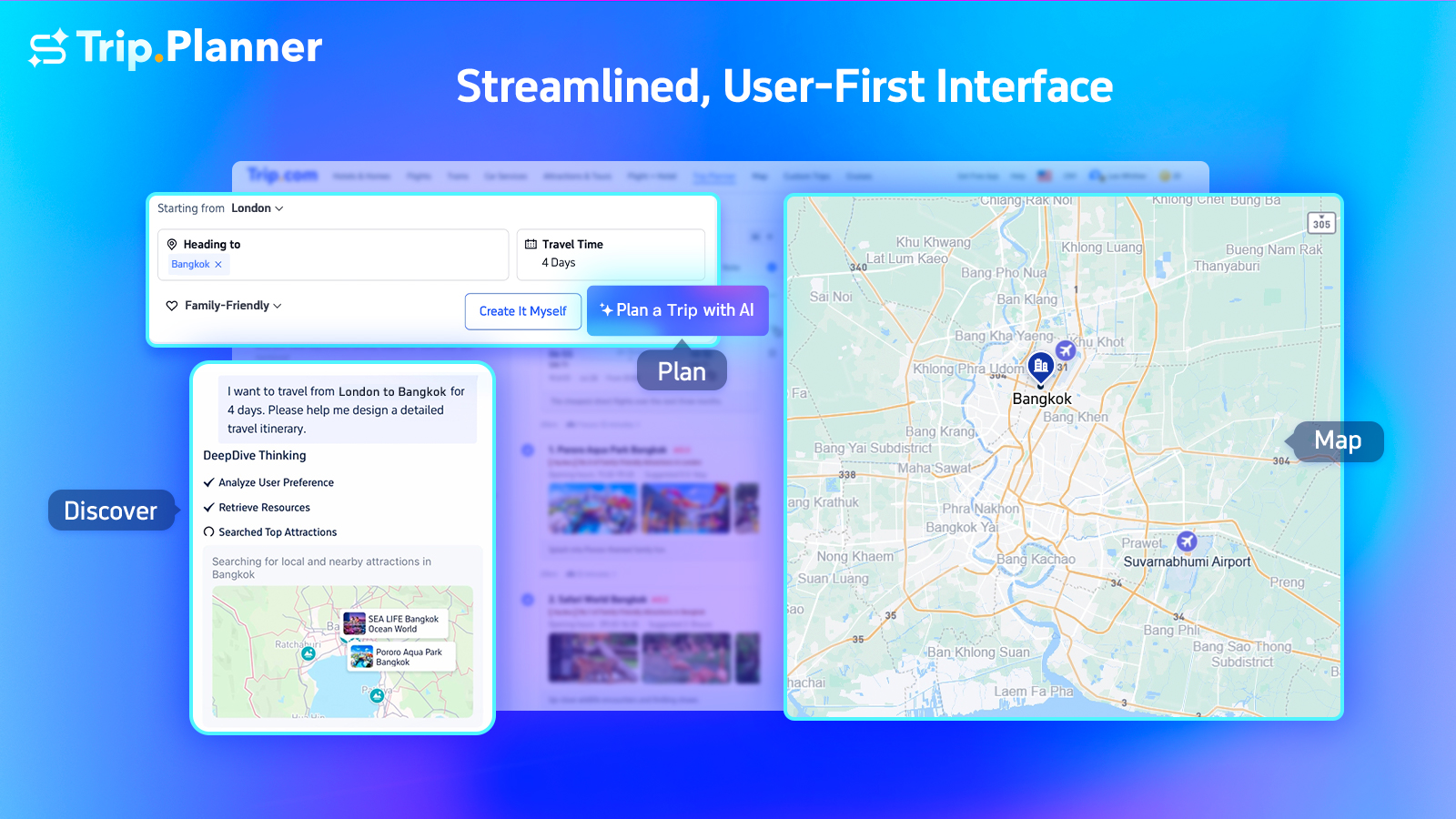
Even the best AI models can hallucinate current operating hours or miss temporary closures. Cross-check the suggested venues against official websites or recent reviews. If a restaurant is listed as open but is actually closed on Mondays, tell the AI. It can then reassign that time slot to another activity or a break.

Use the refinement stage to inject your unique style. Ask for dietary-specific restaurant recommendations, request a route that avoids steep hills for mobility reasons, or ask for evening activities that fit a specific budget. The more detailed your constraints, the more the AI can tailor the plan to your actual travel style.
Verify bookings and check links
AI travel planning 2026 tools are excellent for drafting itineraries, but they do not book flights, hotels, or tours. They generate text based on patterns, not real-time inventory. A plan that looks perfect on screen might rely on a hotel that is fully booked, a flight that has been cancelled, or a restaurant that closed last year. Treating AI output as a confirmed reservation is the fastest way to ruin a trip.
You must manually verify every link and availability item. Start by clicking each URL in your generated itinerary to ensure it leads to a legitimate booking page, not a broken link or a phishing site. Then, visit the official airline, hotel, or attraction website to confirm prices and dates. Prices change hourly; the AI may have pulled data from weeks ago. If a tool suggests a specific room type or fare class, check the carrier’s site directly to see if it is still bookable.
This verification step is non-negotiable. It takes less time to double-check five links than to deal with a missed flight or a cancelled hotel stay. Once you have confirmed everything, save your own copies of the booking confirmations. Do not rely on the AI tool to remind you of your reservations.


As an Amazon Associate, we may earn from qualifying purchases.
Common AI planning mistakes to avoid
AI travel planning 2026 tools are powerful, but they are not infallible. The biggest risk isn't that the AI fails to find a hotel; it's that it creates a schedule that looks perfect on paper but collapses in reality. When you rely too heavily on automated suggestions without critical review, small errors compound into major trip disruptions.
Over-scheduling and ignoring travel time
AI models often treat travel as instantaneous. They might suggest a museum at 9:00 AM, lunch at 11:30 AM, and a park visit at 12:30 PM, ignoring the 45-minute transit time between locations. This "instant teleportation" bias leads to rushed experiences and missed connections. Always add buffer time manually. If the AI says two spots are 20 minutes apart, double that estimate to account for traffic, walking distances, and security checks.
Blind trust in availability
AI tools aggregate data from various sources, but real-time inventory changes fast. A room or tour listed as available by an AI planner might have just been booked by another user. Never assume a booking is confirmed until you receive a direct confirmation email from the provider. Treat AI suggestions as a starting point for verification, not a final reservation.
Frequently asked questions about AI travel planning
How much does AI travel planning software cost?
Most AI travel planning 2026 tools operate on a freemium model. Apps like MonkeyTravel, Mindtrip, and Wonderplan offer core itinerary generation and budget tracking for free, which covers the needs of most casual travelers. Premium tiers typically unlock advanced features like real-time flight rebooking, offline access to complex multi-city itineraries, and priority customer support. For occasional planners, the free versions are often sufficient, but frequent travelers may find value in the time-saving automation of paid subscriptions.
Can AI planners handle last-minute changes reliably?
AI tools excel at processing large datasets quickly, making them useful for finding alternative flights or hotels when plans shift. However, they rarely have direct integration with airline reservation systems to execute changes automatically. You should treat AI outputs as a planning assistant rather than a booking agent. Always verify availability and booking status directly with the airline or hotel provider before making final commitments, especially for same-day travel.
Are AI-generated itineraries accurate for 2026 travel?
The accuracy of AI itineraries depends on the freshness of the data source. While models are trained on vast amounts of historical data, specific details like local transport schedules, entry requirements, and business hours change frequently. Use AI to structure your trip and discover activities, but cross-reference key logistical details—such as visa requirements and local transit apps—with official government or transport authority websites to ensure your plan is current.
No comments yet. Be the first to share your thoughts!